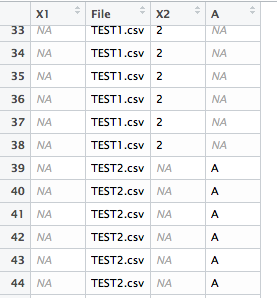
This is an introduction to a package that is useful for reading CSV files from a specified folder at once. The loaded files are converted to data.frame by filename and column.
Additionally. The “tcltk” package is used in the execution command to allow the folder to be specified in the GUI.
Package version is 1.1.3. Checked with R version 4.2.2.
Install Package
Run the following command.
#Install Package
install.packages("readbulk")
Example
See the command and package help for details.
#Loading the library
library("readbulk")

#Loading Files:read_bulk command
#Existence or non-existence of sub-folders:subdirectories option
#Adding data to existing data:data option;Specify existing data name
#Factorize data consisting only of strings:stringsAsFactor option
library("tcltk")
raw_data <- read_bulk(directory = paste(as.character(tkchooseDirectory(title = "Select Folder"),
                                                     sep = "", collapse ="")),
                      subdirectories = FALSE,
                      data = NULL, stringsAsFactor = TRUE)
I hope this makes your analysis a little easier !!