The “stargazer” package has a long history of version upgrades since its release in 2012. This package can output “LaTeX” or “html” code with table formatting to a file or display it as text in the R console.
It is a very good package, and if you check the help, you will soon be able to use all the features except the introductory code. In this introduction, we will show two examples of table output, combining the “cat” and “capture.output” commands, to solve the beginner’s problem of how to save the results to a file. table output, combining the “cat” and “capture.output” commands.
Package version is 5.2.2. R version 4.2.2 is confirmed.
Install Package
Run the following command.。
#Install Package
install.packages("stargazer")
Execute command
詳細はコメント、パッケージヘルプを確認してください。
install.packages("stargazer")

#Loading the library
library("stargazer")

###Creating Data Examples#####
a <- sample(1:100, 100, replace = FALSE)
TestData1 <- data.frame(Data1 = a,
                        Data2 = c(-a[1:80], sample(210:230, 20, replace = TRUE)),
                        Data3 = c(a[1:80], sample(210:230, 20, replace = TRUE)),
                        Data4 = sample(150:180, 100, replace = TRUE))
b <- sample(1:50, 100, replace = TRUE)
TestData2 <- data.frame(Data1 = b,
                        Data2 = c(-b[1:80], sample(210:230, 20, replace = TRUE)),
                        Data3 = c(b[1:80], sample(210:230, 20, replace = TRUE)),
                        Data4 = sample(150:180, 100, replace = TRUE))
##############################

###Use 'cat','capture.output' command to output all sample tables#####
#type option:"latex","text","html"
#In the example, output as html file

#Summarize data and output html file to working folder
#summary option:TRUE
cat(capture.output(stargazer(TestData1, type = "html", summary = TRUE,
                             align = TRUE, single.row = TRUE, no.space = TRUE)),
    file = "Table1.html", append = FALSE)

#Not summarize data and output html file to working folder
#Adapt the 'head' command because of the large amount of data
#rownames option:FALSE
#sumary optio:FALSE
cat(capture.output(stargazer(head(TestData1), type = "html", summary = FALSE, rownames = FALSE,
                             align = TRUE, single.row = TRUE, no.space = TRUE)),
    file = "Table2.html", append = FALSE)
Output Examples
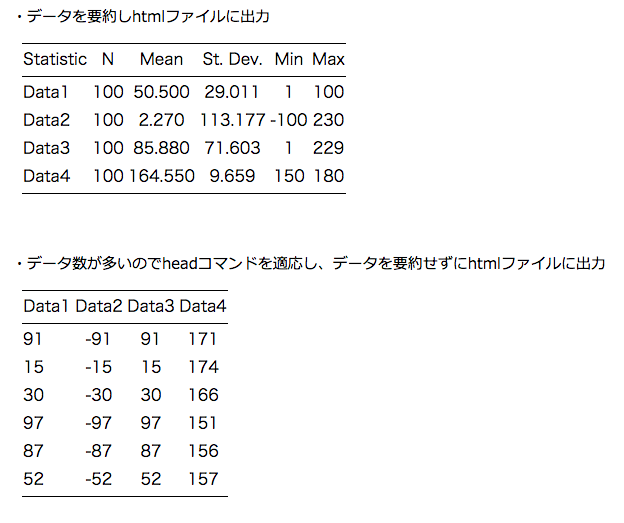
It is not an image and can be copied and pasted into a browser.
・Summarize data and output html file
・Not summarize data and output html file
I hope this makes your analysis a little easier !!