 からだにいいもの
 Rで解析:docxやpptxファイルを作成するのに便利「officer」パッケージ
ワードやパワーポイントのdocxとpptxファイル作成に便利なパッケージの紹介です。紹介ではワードファイルのみに注目し紹介します。工夫次第では非常に有用なパッケージだと考えます。
パッケージバージョンは0.4.4。windows11のR version 4.2.2で確認しています。
<おすすめのRに関する書籍です>
![R統計解析パーフェクトマスター(R4完全対応)[統計&機械学習第2版]](https://m.media-amazon.com/images/I/61LmKnAK1fL._SL500_.jpg)
R統計解析パーフェクトマスター(R4完全対応)[統計&機械学習第2版]
R4に対応した網羅的な解説書。統計解析と機械学習の両方をカバーする。
 www.amazon.co.jp
パッケージのインストール
下記コマンドを実行してください。
#パッケージのインストール
install.packages("officer")
スポンサーリンク
コマンドの紹介
詳細はコマンド、各パッケージのヘルプを確認してください。
初めにワードファイルを操作するコマンドをいくつか紹介します。コマンドの使用例は下記の「TestDocx2での操作例」を確認してください。
#パッケージの読み込み
library("officer")

#ワードファイルの読み込みまたはひな形を作成:read_docxコマンド
#ファイル読み込み:pathオプション;指定が無ければひな形を作成
TestDocx <- read_docx()
#class確認
class(TestDocx)
[1] "docx"

#docx classに段落を追加:body_add_parコマンド
#現在の段落を基準に段落を追加する位置を指定:
#posオプション;on:上書き,before:前に追加,after:後に追加
body_add_par(x = TestDocx,
             value = "てすと、テスト, TEST, test on",
             style = "Normal",
             pos = "on")

#docx classを保存:printコマンド
#保存場所を指定:targetオプション
#ファイル名のみだと作業フォルダに保存
print(TestDocx, target = "TEST.docx")

##########################################################
###以下、コマンドの紹介なので実行してもエラーが出ます#####
###コマンドの使用例は下記の「TestDocx2での操作例」を参照##
###xオプションにはワードドキュメントを設定します##########
##########################################################
#段落の位置を指定する:cursor_XXXXコマンド
#docx classを指定:xオプション
#先頭:cursor_beginコマンド
cursor_begin(x = ワードドキュメント)
#最後:cursor_endコマンド
cursor_end(x = ワードドキュメント)
#キーワードで指定:cursor_reachコマンド
cursor_reach(x = ワードドキュメント, keyword = キーワード)
#現在位置の後ろ:cursor_backwardコマンド
cursor_backward(x = ワードドキュメント)
#現在位置の前:cursor_forwardコマンド
cursor_forward(x = ワードドキュメント)

#現在位置の段落を削除:body_removeコマンド
#docx classを指定:xオプション
body_remove(x = ワードドキュメント)

#現在位置の段落に画像を追加:body_add_imgコマンド
#画像ファイルパスを指定:srcオプション
body_add_img(x = ワードドキュメント, src,
       width = 幅, height = 高さ,
             style = "centered", pos = "after")

#現在位置の段落にテーブルを追加:body_add_tableコマンド
#データを指定:valueオプション
#テーブルフォーマットを指定:styleオプション;"Normal Table",
#"table_template","Light List Accent 2","Table Professional"が指定可能
body_add_table(x = TestDocx, value, style, pos = "after", first_row = TRUE,
               first_column = FALSE, last_row = FALSE, last_column = FALSE,
               no_hband = FALSE, no_vband = TRUE)
・TestDocx2での操作例
###ワードファイル作成#####
TestDocx2 <- read_docx()
#段落を追加
body_add_par(x = TestDocx2,
             value = "段落1、てすと、テスト, TEST, test on",
             style = "Normal",
             pos = "on")
body_add_par(x = TestDocx2,
             value = paste(1, 3, 5, 99999, 8, collapse = " "),
             style = "Normal",
             pos = "after")
body_add_par(x = TestDocx2,
             value = paste(c(LETTERS[1:24], "AAA", letters[1:5]), collapse = " "),
             style = "Normal",
             pos = "after")
########

###cursor_reachとbody_removeコマンドの組み合わせ例#####
#TestDocx2の2段落目を削除
cursor_reach(x = TestDocx2, keyword = 99999)
body_remove(x = TestDocx2)
#保存
print(TestDocx2, target = "TEST2.docx")
########

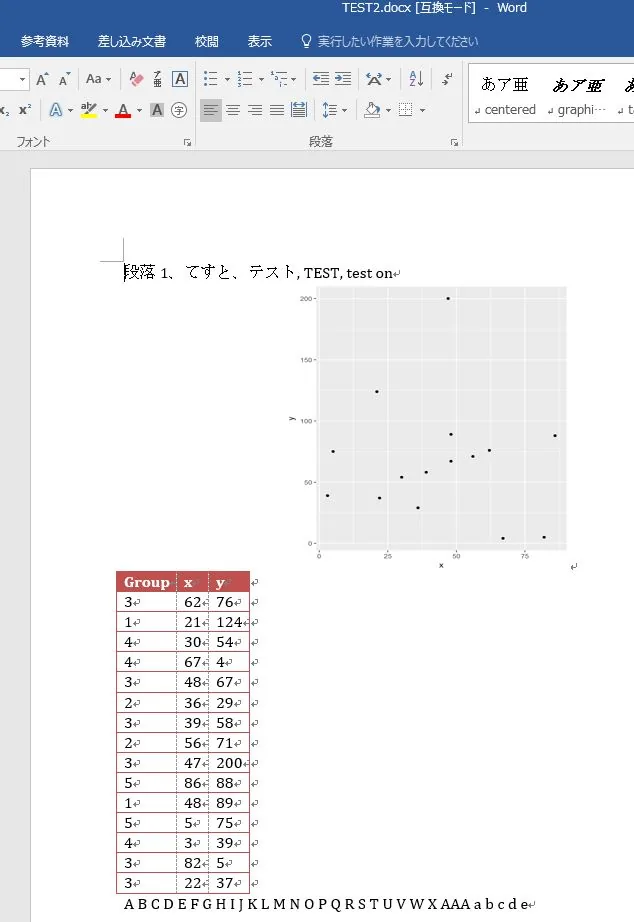
###body_add_imgとbody_add_tableコマンドの組み合わせ例#####
#データ例の作成
n <- 15
TestData <- data.frame("Group" = sample(paste0("Group", 1:5), n, replace = TRUE),
                          "x" = sample(c(1:100), n, replace = TRUE),
                          "y" = sample(c(1:200), n, replace = TRUE))

#tempフォルダに画像を作成
src <- tempfile(fileext = ".png")
png(filename = src, width = 5, height = 6, units = 'in', res = 300)
library("ggplot2")
ggplot(TestData, aes(x, y)) +
  geom_point()
dev.off()
#TestDocx2のTESTを含む段落を選択
cursor_reach(x = TestDocx2, keyword = "TEST")
#画像を差し込む
body_add_img(x = TestDocx2, src = src, width = 3, height = 3,
             style = "centered", pos = "after")
#テーブルを差し込む
body_add_table(x = TestDocx2, value = TestData,
               style = "Light List Accent 2", pos = "after", first_row = TRUE,
               first_column = FALSE, last_row = FALSE, last_column = FALSE,
               no_hband = FALSE, no_vband = TRUE)
#保存
print(TestDocx2, target = "TEST2.docx")
########
出力例
少しでも、あなたの解析が楽になりますように!!

スポンサーリンク