パワーポイントやエクセルの中で編集可能な図を出力できるパッケージの紹介です。図はRに標準で収録されている「plot」コマンドだけでなく「ggplot2」パッケージの出力に対応しています。本パッケージは「officer」パッケージと組み合わせて使用します。
なお、紹介バージョンではエクセルへの出力はエラーで失敗します。そのため、実行コマンドで参考としてコメントアウトで紹介しています。しかし、パワーポイントへの出力は問題なく、パワーポイント内で図の編集が可能です。
パッケージバージョンは0.3.0。windows11のR version 4.2.2で確認しています。
パッケージのインストール
下記コマンドを実行してください。
#パッケージのインストール
install.packages("rvg")
実行コマンド
詳細はコマンド、パッケージのヘルプを確認してください。
・準備
###データ例の作成#####
#officerパッケージがなければインストール
if(!require("officer", quietly = TRUE)){
install.packages("officer");require("officer")
}
#ggh4xパッケージがなければインストール
if(!require("ggh4x", quietly = TRUE)){
install.packages("ggh4x");require("ggh4x")
}
#tidyverseパッケージがなければインストール
if(!require("tidyverse", quietly = TRUE)){
install.packages("tidyverse");require("tidyverse")
}
set.seed(1234)
n <- 50
TestData <- tibble(Group = sample(paste0("Group ", 1:2),
n, replace = TRUE),
SubGroup = sample(paste0("SubGroup ", 1:3),
n, replace = TRUE),
Data_X = 1:n,
Data_Y = rnorm(n))
#########################################
###「ggh4x」パッケージを利用して作図#####
#########################################
#https://www.karada-good.net/analyticsr/r-753/
#各コマンドのstripオプションに体裁を適応する:strip_themedコマンド
TestStrip <- strip_themed(
#水平方向の体裁
#listで各ラベルの色を設定可能:fill,color
background_x =
list(element_rect(fill = "dodgerblue"),
element_rect(fill = "green"),
element_rect(fill = "white")),
text_x = elem_list_text(colour = "black",
face = "bold"),
#by_layer_xオプション:FALSE:異なる要素を個々に適応
by_layer_x = FALSE,
#垂直方向の体裁
background_y = elem_list_rect(
fill = c("gold", "red")
),
text_y = elem_list_text(angle = c(0, 45)),
#by_layer_yオプション:FALSE:異なる要素を個々に適応
by_layer_y = TRUE
)
#プロット;BasePlotに保存する
Ggh4xPlot <- ggplot(TestData, aes(x = Data_X,
y = Data_Y,
color = Group)) +
geom_point() +
theme(axis.line = element_line(colour = "black")) +
facet_grid2(rows = vars(Group), cols = vars(SubGroup),
scales = "fixed", space = "fixed",
axes = "margins", remove_labels = "none",
strip = TestStrip)
#########################################
###「ggplot2」パッケージを利用して作図###
#########################################
BoxPlot <- ggplot(data = TestData,
mapping = aes(x = Group,
y = Data_Y,
fill = Group)) +
geom_boxplot()
########・「rgv」パッケージでパワーポイントエクセルへ図を出力する
#パッケージの読み込み
library("rvg")
#########################################
###パワーポイントに挿入##################
#########################################
#グラフの変換:dmlコマンド
#ggplot以外の作図コマンドを指定:codeオプション
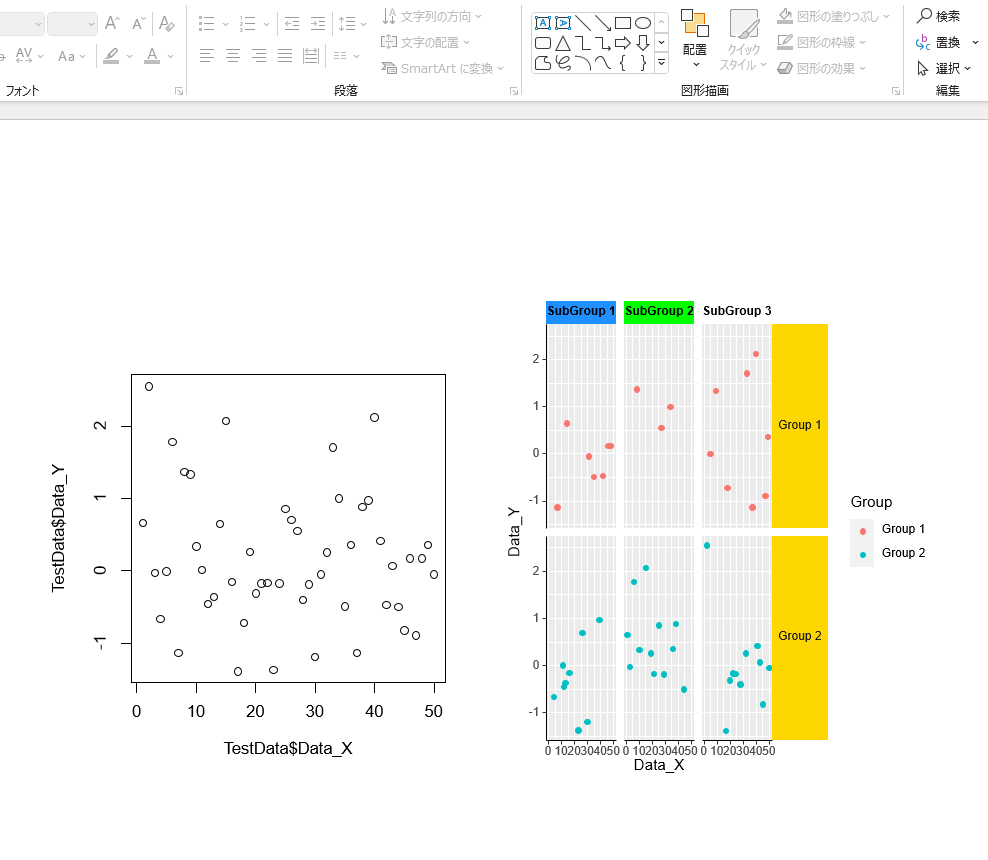
TestPlot <- dml(code = plot(TestData$Data_X, TestData$Data_Y))
#ggplotオブジェクトを指定:ggobj
TestGGobj <- dml(ggobj = Ggh4xPlot)
###「officer」パッケージのコマンドで埋め込む
#パワーポイントを新規作成:read_pptxコマンド
NewPPT <- read_pptx()
#スライド追加:add_slideコマンド
NewPPT <- add_slide(NewPPT, layout = "Title and Content",
master = "Office Theme")
#スライドに図を追加:ph_withコマンド
NewPPT <- ph_with(NewPPT, value = TestPlot,
location = ph_location_left())
NewPPT <- ph_with(NewPPT, value = TestGGobj,
location = ph_location_right())
#作業フォルダにパワーポイントを保存
print(NewPPT, target = "NewPPT.pptx")
########
#########################################
###エクセルに挿入########################
#########################################
###「officer」パッケージのコマンドで埋め込む
#エクセルを新規作成:read_xlsxコマンド
#NewXLSX <- read_xlsx()
#シートを追加
#NewXLSX <- add_sheet(NewXLSX, label = "てすと")
##「rvg」パッケージ
#シートに図を追加:xl_add_vgコマンド;
#設定しても"Feuil1"シートが追加されます
#ggplot以外の作図コマンドを指定:codeオプション
#NewXLSX <- xl_add_vg(NewXLSX, sheet = "てすと",
# code = plot(TestData$Data_X, TestData$Data_Y),
# width = 5, height = 5, left = 1, top = 2 )
#ggplotオブジェクトを指定:ggobj
#NewXLSX <- xl_add_vg(NewXLSX, sheet = "てすと",
# code = print(Ggh4xPlot),
# width = 5, height = 5, left = 2, top = 2 )
#作業フォルダにエクセルを保存
#print(NewXLSX, target = "NewXLSX.xlsx")
########出力例
少しでも、あなたの解析が楽になりますように!!