Rで解析:円グラフの散布図を作成!「scatterpie」パッケージ

円グラフの散布図を作成するパッケージの紹介です。非常に面白い表現だと思います。

パッケージバージョンは0.1.7。実行コマンドはR version 4.2.2で確認しています。

パッケージのインストール

下記コマンドを実行してください。

#パッケージのインストール
install.packages("scatterpie")

実行コマンド

詳細はコマンド、パッケージのヘルプを確認してください。

###データ例の作成#####
#tidyverseパッケージがなければインストール
if(!require("tidyverse", quietly = TRUE)){
  install.packages("tidyverse");require("tidyverse")
}
set.seed(1234)
n <- 10
TestData <- tibble(Group = sample(paste0("Group", 1:4), n,
                                  replace = TRUE),
                   #x&#36600;&#12398;&#24231;&#27161;
                   X_Point_Data = sample(c(1:30),
                                       n, replace = TRUE),
                   #y&#36600;&#12398;&#24231;&#27161;
                   Y_Point_Data = sample(c(51:100), n, replace = TRUE),
                   #&#20870;&#12464;&#12521;&#12501;&#12487;&#12540;&#12479;_1
                   YES_Value_Data = sample(c(1:5), n, replace = TRUE),
                   #&#20870;&#12464;&#12521;&#12501;&#12487;&#12540;&#12479;_2
                   NO_Value_Data = sample(c(1:5), n, replace = TRUE),
                   #&#20870;&#12398;&#22823;&#12365;&#12373;
                   Radius = sample(c(5:100), n, replace = TRUE)/30)
########

#&#25955;&#24067;&#22259;&#12398;&#12471;&#12531;&#12508;&#12523;&#12434;&#20870;&#12464;&#12521;&#12501;&#12391;&#25551;&#20889;:geom_scatterpie&#12467;&#12510;&#12531;&#12489;
#&#20870;&#12464;&#12521;&#12501;&#12398;&#22823;&#12365;&#12373;&#12434;&#25351;&#23450;:aes(r = "&#25968;&#20516;")&#12391;&#35373;&#23450;
#&#12487;&#12540;&#12479;&#12434;&#25351;&#23450;:cols&#12458;&#12503;&#12471;&#12519;&#12531;;&#21015;&#21517;&#12391;&#25351;&#23450;
#&#12464;&#12521;&#12501;&#22615;&#33394;&#12398;&#22793;&#26356;&#12399;scale_fill_manual&#12467;&#12510;&#12531;&#12489;&#12434;&#21033;&#29992;
ggplot() +
  geom_scatterpie(data = TestData,
                  aes(x = X_Point_Data, y = Y_Point_Data, r = Radius),
                  cols = c("YES_Value_Data", "NO_Value_Data"),
                  alpha = 1.0) +
  scale_fill_manual(values = c("#fef0e7", "#5c463e"))

#&#12464;&#12521;&#12501;&#12395;&#20961;&#20363;&#12434;&#36861;&#21152;:geom_scatterpie_legend&#12467;&#12510;&#12531;&#12489;
#&#20870;&#12464;&#12521;&#12501;&#12398;&#20961;&#20363;&#22823;&#12365;&#12373;&#12434;&#25351;&#23450;:radius&#12458;&#12503;&#12471;&#12519;&#12531;
#&#20998;&#21106;&#25968;&#12434;&#25351;&#23450;:n&#12458;&#12503;&#12471;&#12519;&#12531;
#y&#36600;&#12521;&#12505;&#12523;&#12364;[&#12521;&#12505;&#12523;&#21517; + r]&#12392;&#12394;&#12427;,labs&#12467;&#12510;&#12531;&#12489;&#12391;&#20462;&#27491;&#21487;&#33021;
ggplot() +
  geom_scatterpie(data = TestData,
                  aes(x = X_Point_Data, y = Y_Point_Data, r = Radius),
                  cols = c("YES_Value_Data", "NO_Value_Data"),
                  alpha = 1.0) +
  scale_fill_manual(values = c("#fef0e7", "#5c463e")) +
  #geom_scatterpie_legend&#12467;&#12510;&#12531;&#12489;
  geom_scatterpie_legend(radius = TestData$Radius, x = 0, y = 45, n = 5) +
  #y&#36600;&#12521;&#12505;&#12523;&#12434;&#35519;&#25972;
  labs(y = "TEST")

出力例

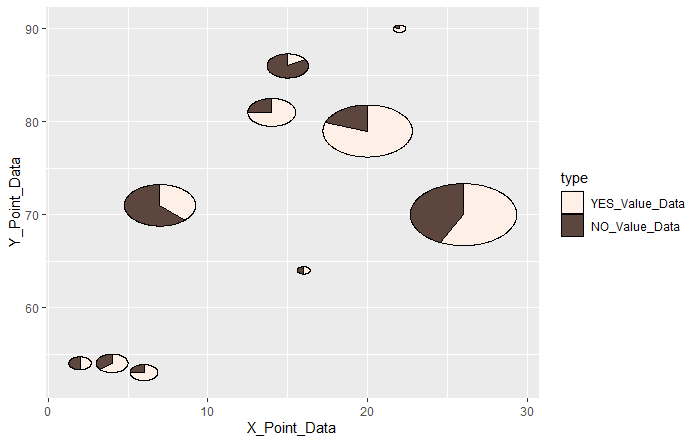
・geom_scatterpieコマンド

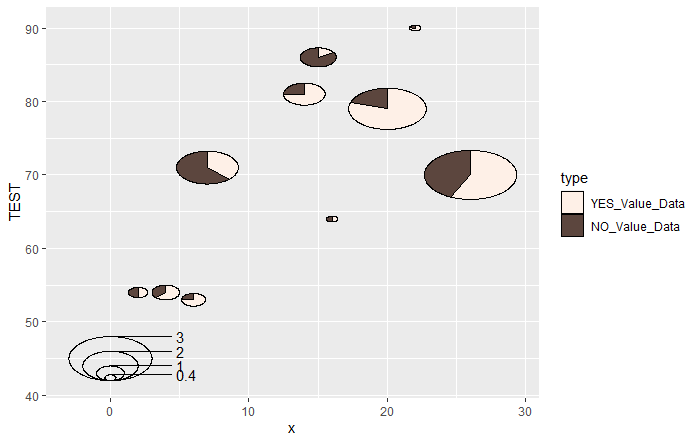
・geom_scatterpie_legendコマンド

少しでも、あなたの解析が楽になりますように!!
Prices and shipping availability may change. Please refer to the product page at time of purchase.
Content displayed on this site is provided by Amazon and may be updated or removed.
Amazon Associate, karada-good earns income through qualifying sales.
タイトルとURLをコピーしました