 からだにいいもの
 Rで解析:文字のプロットが楽しい「string2path」パッケージ
True Type font または Open Type fontのアウトライン情報を取得することができるパッケージの紹介です。取得した情報を利用してggplot2などでプロットすることができます。色々な使い道があるのではと思います。パッケージにはアウトライン情報を「そのまま」、「加工」、「塗りつぶし」の処理を適応した情報を取得できるコマンドが収録されています。
なお、日本語を利用する際には環境によってはUTF-8へコードを変換する必要があります。紹介するコマンドでは変換にbaseのiconvコマンドを利用しています。
パッケージバージョンは0.0.4。windows 10のR version 4.1.2で動作を確認しています。
<おすすめのRに関する書籍です>

RStudioではじめるRプログラミング入門 | ギャレット・グロ-ルマンド, 大橋真也, 長尾高弘
統計の前に、まずRをプログラミング言語として覚える一冊。身近な題材で関数・条件分岐・ループを学べる。
パッケージのインストール
下記コマンドを実行してください。
#パッケージのインストール
install.packages("devtools")
install.packages("string2path")
スポンサーリンク
コマンドの紹介
下記コマンドを実行してください。詳細は各パッケージのヘルプを確認してください。
#パッケージの読み込み
library("string2path")

#ggplot2を使うためにtidyverse
#install.packages("tidyverse")
library("tidyverse")

#フォントファイルの種類とパスを確認
#install.packages("systemfonts")
FontPathData <- systemfonts::system_fonts()
show(FontPathData)

#プロットする文字の準備
#念のためUTF-8へコードを変換
WriteFont <- iconv("KARADANI\nいいもの", to = "utf-8")

###フォントアウトラインをプロット:string2pathコマンド#####
#フォントファイルからアウトラインを取得
#windowsではバックスラッシュの記述に注意"\\"
PathData <- string2path(WriteFont, "C:\\WINDOWS\\Fonts\\meiryo.ttc")
show(PathData)
# A tibble: 1,234 x 4
     x     y glyph_id path_id
  <dbl> <dbl>    <dbl>   <dbl>
1 0.438  0            0       0
2 0.359  0            0       0
3 0.166  0.220        0       0
4 0.121  0.173        0       0
5 0.121  0            0       0
6 0.0602 0            0       0
7 0.0602 0.491        0       0
8 0.121  0.491        0       0
9 0.121  0.236        0       0
10 0.354  0.491        0       0
# ... with 1,224 more rows

#ggplot2でプロット
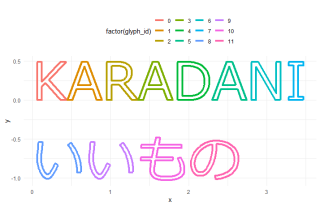
ggplot(PathData) +
  geom_path(aes(x, y, group = path_id, colour = factor(glyph_id)), size = 1.5) +
  theme_minimal() + coord_equal() +
  theme(legend.position = "top")
########

###フォントアウトラインを加工:string2strokeコマンド#####
#フォントファイルからアウトラインを取得
#windowsではバックスラッシュの記述に注意"\\"
StrokData <- string2stroke(WriteFont, "C:\\WINDOWS\\Fonts\\meiryo.ttc", line_width = 0.05)
show(StrokData)
# A tibble: 7,815 x 5
     x       y glyph_id path_id triangle_id
  <dbl>   <dbl>    <dbl>   <dbl>       <dbl>
1 0.370  0.0250        0       0           0
2 0.347 -0.0250        0       0           0
3 0.167  0.257         0       0           0
4 0.347 -0.0250        0       0           1
5 0.165  0.183         0       0           1
6 0.167  0.257         0       0           1
7 0.167  0.257         0       0           2
8 0.165  0.183         0       0           2
9 0.146  0.163         0       0           2
10 0.167  0.257         0       0           3
# ... with 7,805 more rows

#ggplot2でプロット
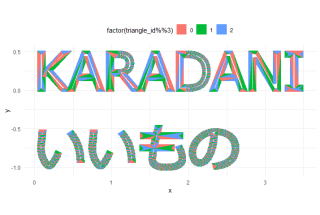
ggplot(StrokData) +
  geom_polygon(aes(x, y, group = triangle_id, fill = factor(triangle_id %% 3)), size = 0.1) +
  theme_minimal() + coord_equal() +
  theme(legend.position = "top")
########

###フォントアウトラインを塗りつぶし:string2fillコマンド#####
#フォントファイルからアウトラインを取得
#windowsではバックスラッシュの記述に注意"\\"
PathData <- string2fill(WriteFont, "C:\\WINDOWS\\Fonts\\meiryo.ttc")
show(PathData)
# A tibble: 3,858 x 5
     x      y glyph_id path_id triangle_id
  <dbl>  <dbl>    <dbl>   <dbl>       <dbl>
1 0.262 -0.955        8      13           0
2 0.191 -0.954        8      13           0
3 0.193 -0.954        8      13           0
4 0.262 -0.955        8      13           1
5 0.193 -0.954        8      13           1
6 0.196 -0.953        8      13           1
7 0.262 -0.955        8      13           2
8 0.196 -0.953        8      13           2
9 0.198 -0.952        8      13           2
10 0.262 -0.955        8      13           3
# ... with 3,848 more rows

#ggplot2でプロット
#fillの剰余(%%)で色の分割を調整
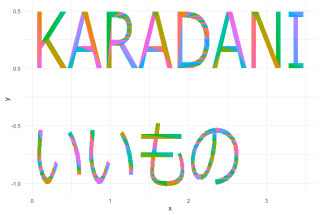
ggplot(PathData) +
  geom_polygon(aes(x, y, group = triangle_id, fill = factor(triangle_id %% 15))) +
  theme_minimal() +
  theme(legend.position = "none")
########
出力例
・string2pathコマンド
・string2strokeコマンド
・string2fillコマンド
少しでも、あなたの解析が楽になりますように!!


スポンサーリンク