 からだにいいもの
 Rで解析:変わり種!暗号資産の情報を取得できます。「crypto2」パッケージ
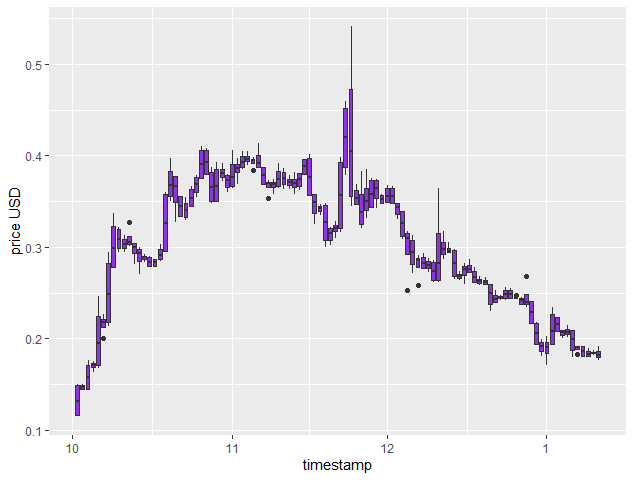
暗号資産の情報をcoinmarketcapから取得するパッケージの紹介です。APIを利用せずにデータを取得しています。取得コマンドを実行すると次の実行まで1分間の待機時間があることに注意です。実行コマンドではXYM(Symbol)の情報を取得し、USD価格をプロットしました。
興味があれば下記リンクで他のコマンドを確認してください。
crypto2:https://github.com/sstoeckl/crypto2
パッケージのバージョンは1.4.0。実行コマンドはwindows 11のR version 4.1.2で動作を確認しています。


パッケージのインストール
下記コマンドを実行してください。
#パッケージのインストール
install.packages("crypto2")
スポンサーリンク
実行コマンド
詳細はコマンド、パッケージヘルプを確認してください。
#パッケージの読み込み
library("crypto2")

#tidyverseパッケージがなければインストール
if(!require("tidyverse", quietly = TRUE)){
  install.packages("tidyverse");require("tidyverse")
}

#暗号資産のリストを取得:crypto_listコマンド
coins <- crypto_list(only_active = TRUE)

#XYM(Symbol)の情報を抜き出し
coins %>%
  filter(symbol == "XYM") -> XYMList

#確認
XYMList
#A tibble: 1 x 8
id name   symbol     slug  rank is_active first_historical_data last_historical_data
<int> <chr>  <chr>  <chr>  <int>     <int> <date>                <date>
8677 Symbol XYM    symbol   212         1 2021-03-19            2022-01-11

#暗号資産の情報を取得:crypto_infoコマンド
#取得リストを基に情報を取得します
#リストから取得する各暗号資産の情報:limitオプション
coin_info <- crypto_info(XYMList, limit = NULL)
#確認
coin_info
# A tibble: 1 x 18
#id name   symbol category description slug  logo  subreddit notice date_added
#* <int> <chr>  <chr>  <chr>    <chr>       <chr> <chr> <chr>     <chr>  <chr>
#  1  8677 Symbol XYM    coin     "## What i~ symb~ http~ ""        ""     2021-03-0~
# ... with 8 more variables: twitter_username <chr>, is_hidden <int>,
#   date_launched <chr>, self_reported_circulating_supply <lgl>, tags <lgl>,
#   self_reported_tags <lgl>, urls <list>, platform <lgl>

#暗号資産の価格を取得:crypto_historyコマンド
coin_hist <- crypto_history(XYMList, limit = 1,
                            start_date = "20211001", end_date = "20220111")
#取得した価格一覧から箱ひげ図を作る
coin_hist %>% select(timestamp, open, high, low, close) %>%
  mutate(timestamp = as.POSIXct(timestamp)) %>%
  gather(key = stock, value = price, open, high, low, close) %>%
  arrange(timestamp) -> PlotData
#プロット
ggplot(PlotData, aes(x = timestamp, y = price, group = timestamp)) +
  labs(y = "price USD") +
  geom_boxplot(fill = "#8d33e5")
出力例
2021.10.01から2022.01.11までのXYM(Symbol)のUSD価格の推移です。
少しでも、あなたの解析が楽になりますように!!
![改訂2版 RユーザのためのRStudio[実践]入門〜tidyverseによるモダンな分析フローの世界 | 松村優哉, 湯谷啓明, 紀ノ定保礼, 前田和寛](https://images-na.ssl-images-amazon.com/images/P/4297121700.09.LZZZZZZZ.jpg)
スポンサーリンク