 からだにいいもの
 Analysis in R: Read a wide variety of files with ease. The ‘ezpickr’ package
This package reads files effortlessly via GUI. The supported 25 files are “csv, csv2, tsv, txt, xls, xlsx, json, html, htm, php, pdf, doc, docx, rtf, RData, Rda, RDS, sav (SPSS), por, sas7bdat, sas7bcat, dta, xpt, mbox and Rmd”. Very easy-to-use packages.
Package version is 2.1.0. Checked with R version 4.2.2.
<おすすめのRに関する書籍です>

時系列分析と状態空間モデルの基礎: RとStanで学ぶ理論と実装
時系列データの扱いを、理論とRおよびStanでの実装の両面から解説。状態空間モデルの入口として。
 www.amazon.co.jp
Install Package
Run the following command.
#Install Package
install.packages("ezpickr")
スポンサーリンク
Example
See the command and package help for details.
#Loading the library
library("ezpickr")

###Creating Data#####
set.seed(1234)
n <- 10
TestData <- data.frame(ID = 1:n,
                       Group = sample(c("A", "Test", "C"),
                                      n, replace = TRUE),
                       Time_A = rnorm(n),
                       Time_B = rnorm(n))

#Install the ForImp package if it is not already present
if(!require("ForImp", quietly = TRUE)){
  install.packages("ForImp");require("ForImp")
}

#Insert missing values
TestData[, 3:4] <- missingmat2(TestData[, 3:4], missing = 10)

#Output as xlsx with save location
#Install the openxlsx package if it is not already present
if(!require("openxlsx", quietly = TRUE)){
  install.packages("openxlsx");require("openxlsx")
}
#Save
setwd(dir = choose.dir(caption = "保存場所を指定"))
write.xlsx(TestData, "TestData.xlsx")
#######

#Reading files with GUI: pick command
#Readable file formats:
#csv, csv2, tsv, txt, xls, xlsx, json, html, htm, php, pdf,
#doc, docx, rtf, RData, Rda, RDS, sav(SPSS), por, sas7bdat,
#sas7bcat, dta, xpt, mbox, Rmd

#Load data example
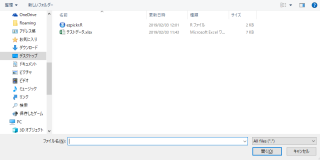
ReadData <- pick()
#Check
ReadData

# A tibble: 10 x 4
    ID Group  Time_A  Time_B
  <dbl> <chr>   <dbl>   <dbl>
1     1 Test   NA      0.705
2     2 Test   NA     -0.647
3     3 A      NA      0.868
4     4 C      -0.517 NA
5     5 A      NA      0.310
6     6 A       0.880 NA
7     7 Test    1.37  NA
8     8 Test   -1.69  NA
9     9 C      -0.627 NA
10    10 Test  NA      0.0114
Output Example
I hope this makes your analysis a little easier !!
![RとPythonで学ぶ[実践的]データサイエンス&機械学習【増補改訂版】 | 有賀友紀, 大橋俊介](https://images-na.ssl-images-amazon.com/images/P/4297120224.09.LZZZZZZZ.jpg)
スポンサーリンク