 からだにいいもの
 Rで解析:txtファイルやsvgファイルなどの違いをHTML Widgetで確認「diffviewer」パッケージ
テキスト(txt),データ(csv),画像(svg,png)ファイルの内容の違いをHTML Widgetで確認できるパッケージの紹介です。RStudioでの使用をおすすめします。
パッケージのバージョンは0.1.2。実行コマンドはRStudioのRStudio 2024.04.2+764
、windows 11のR version 4.3.3で確認しています。
<おすすめのRに関する書籍です>

R言語徹底解説 | Hadley Wickham, 石田基広, 市川太祐, 高柳慎一, 福島真太朗
Advanced Rの邦訳。オブジェクトの仕組みや関数型プログラミングなど、Rの言語仕様を深掘りする。
パッケージのインストール
下記コマンドを実行してください。
# パッケージのインストール
install.packages("diffviewer")
スポンサーリンク
コマンドの紹介
詳細はコマンド、パッケージのヘルプを確認してください。
# パッケージの読み込み
library("diffviewer")

# テキスト(txt),データ(csv),画像(svg,png)ファイルの違いをHTML Widgetで確認:visual_diffコマンド
# 比較ファイルを指定:file_old/file_newオプション
visual_diff(file_old, file_new, width = NULL, height = NULL)

### 使用例 #####
## テキストファイルの比較
# 一時フォルダ(temporary folder)にファイルを作成
File_01 <- tempfile(fileext = ".txt")
File_02 <- tempfile(fileext = ".txt")

# 作成ファイルにテキストを書込み
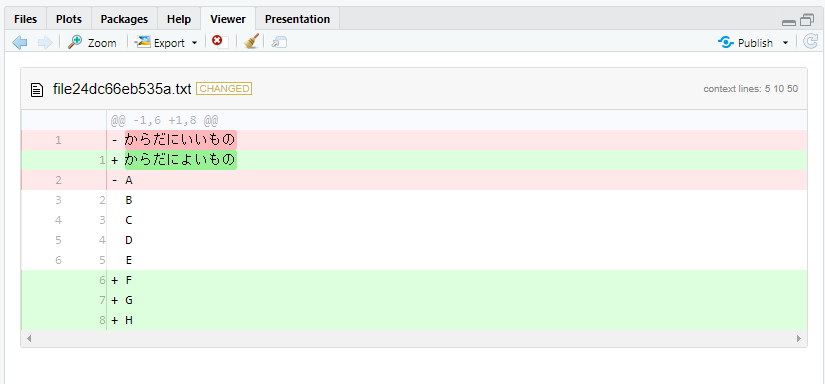
writeLines(c("からだにいいもの", LETTERS[1:5]), File_01)
writeLines(c("からだによいもの", LETTERS[2:8]), File_02)

# ファイル内容を比較
visual_diff(File_01, File_02)
########

## svgファイルの比較
# Rで解析:サイズが小さいSVGファイルを作成「svglite」パッケージ
# https://www.karada-good.net/analyticsr/r-669/
# パッケージのインストール
install.packages("svglite")
# パッケージの読み込み
library("svglite")

# 一時フォルダ(temporary folder)にファイルを作成
SVG_File_01 <- tempfile(fileext = ".svg")
SVG_File_02 <- tempfile(fileext = ".svg")

# ファイルを作成
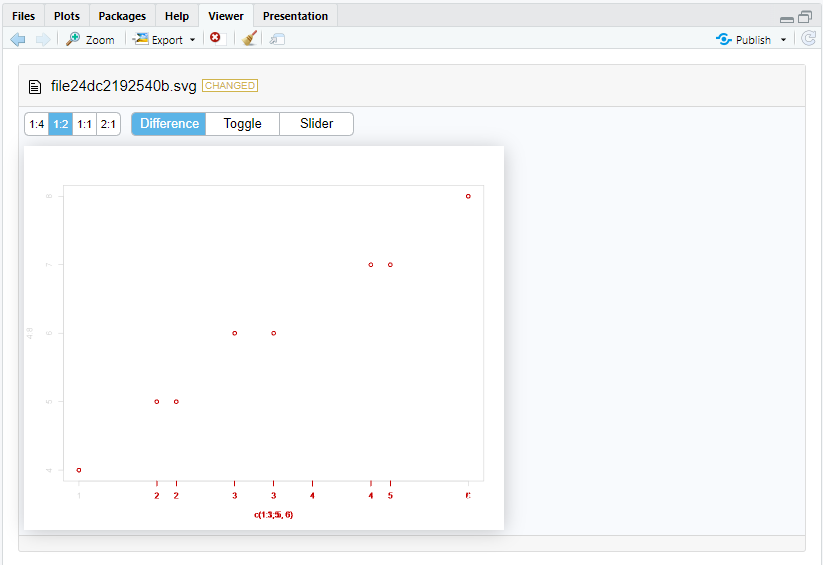
svglite(SVG_File_01);plot(x = 1:5, y = 4:8, xlim = c(1, 5));dev.off()
svglite(SVG_File_02);plot(x = c(1:3, 5, 6), y = 4:8,
                          xlim = c(1, 6), col = "blue");dev.off()

# ファイル内容を比較
visual_diff(SVG_File_01, SVG_File_02)
########
実行例
・テキストファイルの比較
・svgファイルの比較
少しでも、あなたの解析が楽になりますように!!
![データサイエンティストのための最新知識と実践 Rではじめよう! [モダン]なデータ分析](https://m.media-amazon.com/images/I/51UIUVvSFOL._SL500_.jpg)

スポンサーリンク