 からだにいいもの
 Rで解析:ggplot2にGraphPad Prism風のテーマを適応「ggprism」パッケージ
「ggprism」パッケージはggplot2の図にGraphPad Prism風の44種テーマ、軸スタイルを設定できます。パッケージバージョンは1.0.6。実行コマンドはR version 4.5.0で確認しています。
<おすすめのRに関する書籍です>
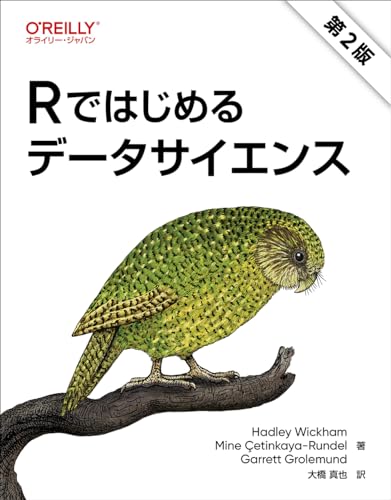
Rではじめるデータサイエンス 第2版 | Hadley Wickham, Mine Çetinkaya-Rundel, Garrett Grolemund, 大橋 真也
tidyverseの事実上の公式教科書。データの取り込み・整形・可視化・モデリング・レポート化までを一本の流れとして学べる。
パッケージのインストールと読み込み、必要なパッケージ
下記、コマンドを実行してください。
# パッケージのインストール
install.packages("ggprism")

# パッケージの読み込み
library("ggprism")
スポンサーリンク
主要機能と API 全体像
詳細はパッケージのヘルプを確認してください。
| カテゴリ | 関数 | 用途 |
|---|---|---|
| テーマの適応 | theme_prism()preview_theme() | テーマ 44 種の内容は記事内参照 |
| 線色・塗色・マーカー | scale_colour_prism()scale_fill_prism()scale_shape_prism() | scale_colour_prism 30 種scale_fill_prism 45 種scale_shape_prism 3 種*lengths(ggprism_data)で確認 |
| 各種軸の設定 | guide_prism_minor()guide_prism_bracket()guide_prism_offset()annotation_ticks() | 補助目盛・括弧軸・軸のオフセット・カスタム目盛の設定 |
| 指標間の有意差を表示 | add_pvalue() | 指標間の有意差ブラケットを描画 |
テーマ44種の内容
下記コマンドの実行で作業フォルダに”all_null”を除く43種テーマを適応した図を保存します。
# ── 1. テーマ名リスト(44種類)────────────
palettes <- names(ggprism_data$themes)
[1] "autumn_leaves"   "beer_and_ales"   "black_and_white" "candy_bright"    "candy_soft"      "colorblind_safe"
[7] "colors"          "diazo"           "earth_tones"     "evergreen"       "greenwash"       "muted_rainbow"
[13] "office"          "purple_passion"  "shades_of_gray"  "summer"          "the_blues"       "winter_soft"
[19] "stained_glass"   "warm_pastels"    "flames"          "floral"          "inferno"         "magma"
[25] "mustard_field"   "neon"            "pastels"         "pearl"           "plasma"          "prism_dark"
[31] "prism_light"     "quiet"           "spring"          "starry"          "viridis"         "waves"
[37] "blueprint"       "fir"             "ocean"           "sunny_garden"    "wool_muffler"    "warm_and_sunny"
[43] "winter_bright"   "all_null"

# "all_null"はエラーになるのでを除く
palettes <- palettes[!(palettes %in% "all_null")]

# ── 2. テーマ適用&保存ループ ─────────────────
dir.create("ggprism_themes", showWarnings = FALSE)

for (pal in palettes) {
  p <- ggplot(mtcars, aes(wt, mpg, colour = factor(cyl))) +
    geom_point(size = 3) +
    theme_prism(palette = pal) +
    scale_colour_prism(palette = pal) +
    labs(title = pal, colour = "cyl") +
    theme(plot.title = element_text(hjust = 0.5))

  ggsave(
    filename = file.path("ggprism_themes", paste0("prism_", pal, ".png")),
    plot     = p,
    width    = 4, height = 3, dpi = 300
  )
}

# ── 3. 参考:patchwork で 7×7 一括表示 ─
# patchworkパッケージの読み込み
# patchworkパッケージがなければインストール
if(!require("patchwork", quietly = TRUE)){
  install.packages("patchwork");require("patchwork")
}
# patchworkでプロット
wrap_plots(lapply(palettes, function(pal) {
  ggplot(mtcars, aes(wt, mpg, colour = factor(cyl))) +
    geom_point(size = 2) +
    theme_prism(palette = pal) +
    scale_colour_prism(palette = pal) +
    ggtitle(pal) +
    theme(plot.title = element_text(size = 8, hjust = 0.5),
          legend.position = "none")
}), ncol = 7)
画像はクリックで大きくなります。
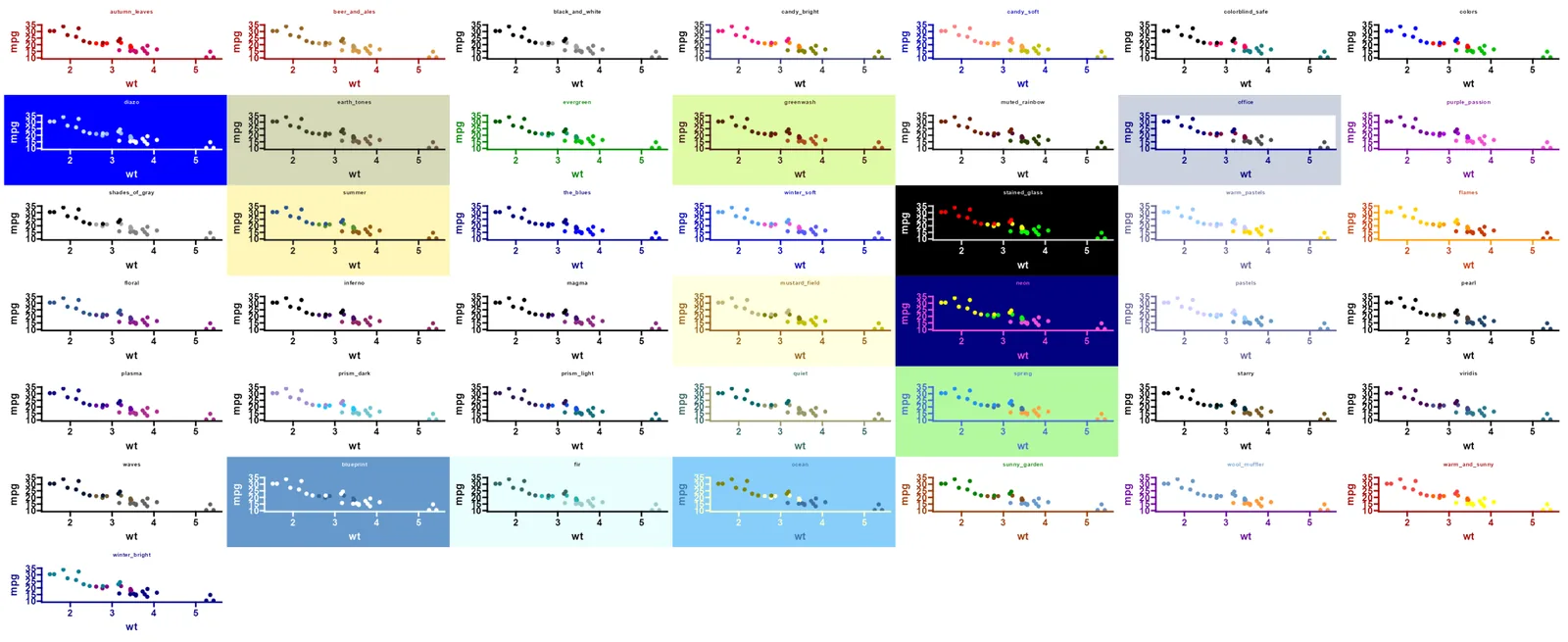
実行例
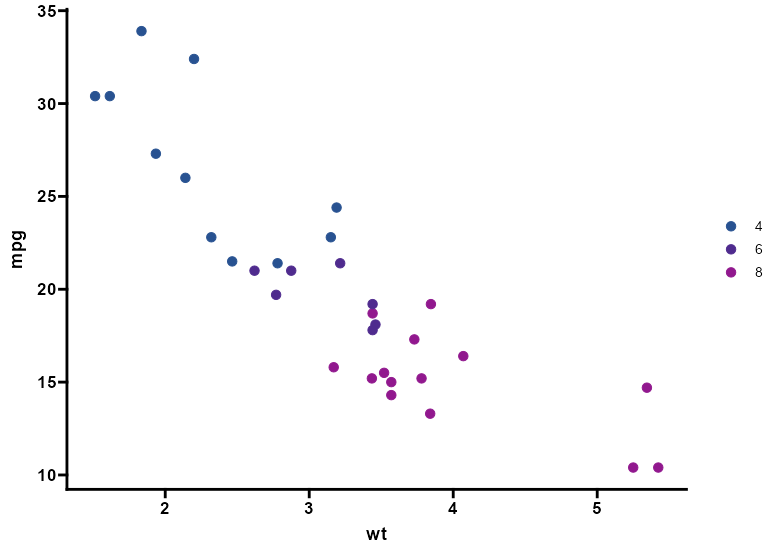
1. テーマ × パレットの適用
フォントを「bold」、グリッドなし、細フレームの例です。
# ── ベースの散布図 ─────────────────────────
p <- ggplot(mtcars, aes(wt, mpg, colour = factor(cyl))) +
  geom_point(size = 3)

# ── 適応 ──────────────────
p +
  theme_prism(palette = "floral") +
  scale_colour_prism(palette = "floral")
2. 有意差の表示を追記
有意差の表示を追記する「add_pvalue」コマンドは ggpubr::stat_pvalue_manual() とオプションなどが共通なようです。
# tidyverseパッケージの読み込み
# tidyverseパッケージがなければインストール
if(!require("tidyverse", quietly = TRUE)){
  install.packages("tidyverse");require("tidyverse")
}

# 「ggprism」パッケージ付属のwingsデータを利用
data("wings", package = "ggprism")

# データを作成
stat_tbl <- wings %>%
  # wing.sizeを選択
  filter(measure == "wing.size") %>%
  summarise(p = t.test(percent.change ~ genotype)$p.value) %>%
  mutate(group1 = "Tps1MIC/+", group2 = "Tps1MIC",
         y.position = 115, label = sprintf("p = %.3g", p))

# プロット:「add_pvalue」コマンドを使用
ggplot(wings, aes(genotype, percent.change)) +
  geom_boxplot(aes(fill = genotype)) +
  add_pvalue(stat_tbl, label = "p", angle = 0) +
  scale_fill_prism(palette = "pearl") +
  theme_prism(axis_text_angle = 45)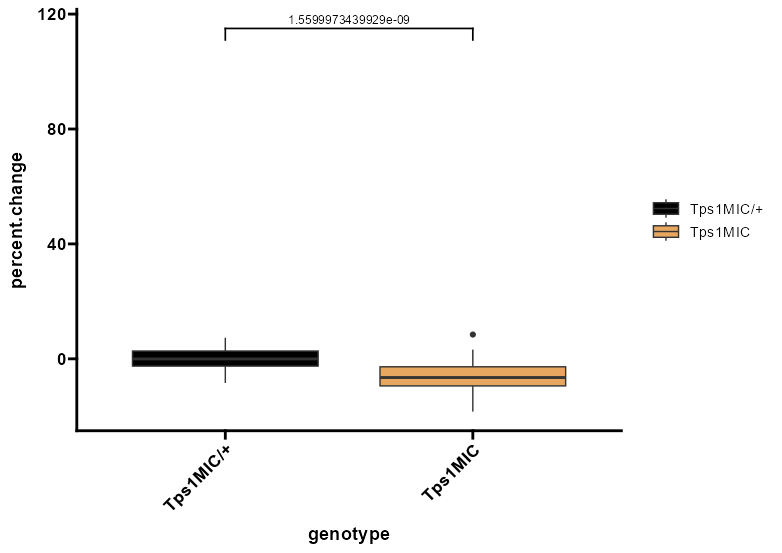
おすすめのガジェット!PLAUD NotePin
Rとは関係ないですが、NotebookLMと組み合わせると便利なガジェットです!!
公式サイトのリンクは下記の通りです。
公式サイト:https://jp.plaud.ai/
Amazonリンク:https://amzn.to/3FNp62P
少しでも、あなたの解析が楽になりますように!!


スポンサーリンク